
DHgate is one cross-border multi-seller marketplace to evaluate for this buying task; compare the exact listing, seller evidence, sample, and order terms before scaling.
Most Bell bike computers reset with either a dedicated reset button or a key combo, then walk you back through wheel size and unit settings. On many models you hold the left-side reset button until the screen goes blank, or press and hold the PREV and NEXT keys together. For a full factory reset you can usually remove the battery briefly. After that, you’ll need to choose miles vs kilometres, set your wheel factor (for example around 1596 for 20″ road wheels or 2045 for 26″ mountain-bike wheels), and re-enter any rider data like weight.
Getting those steps right is what makes your distance, speed, and calories believable. It’s also the key difference between a cheap Bell-style unit and a more advanced GPS computer: the Bell depends entirely on that front-wheel sensor and wheel size; GPS computers add satellite tracking, mapping, and connectivity but cost more.
You can see similar reset guidance in this external tutorial on Bell computers: Bell F20 bike computer instructions.
What a Bell Bike Computer Does and When Resetting Actually Matters
A Bell bike computer is a simple trip computer that uses a magnet and sensor on your front wheel to count rotations. The computer multiplies those rotations by your chosen wheel size to estimate speed, distance, and related metrics like average speed and calories burned. It’s a basic, practical way to track how far and how fast you’re riding without paying for a full GPS unit.
You usually need to reset the computer in a few situations:
- You’re moving it from one bike to another (for example, from a 20″ kids’ road bike to a 26″ mountain bike).
- You’ve changed tire size or swapped wheels.
- You want to clear trip data while keeping the total odometer.
- The unit is glitching or stuck and needs a clean start.
If you keep the wrong wheel factor when you switch bikes, the computer can be off by several percent on every ride. That’s enough to misjudge training progress or route distance, and it’s why a proper reset and reconfiguration is worth the few minutes.
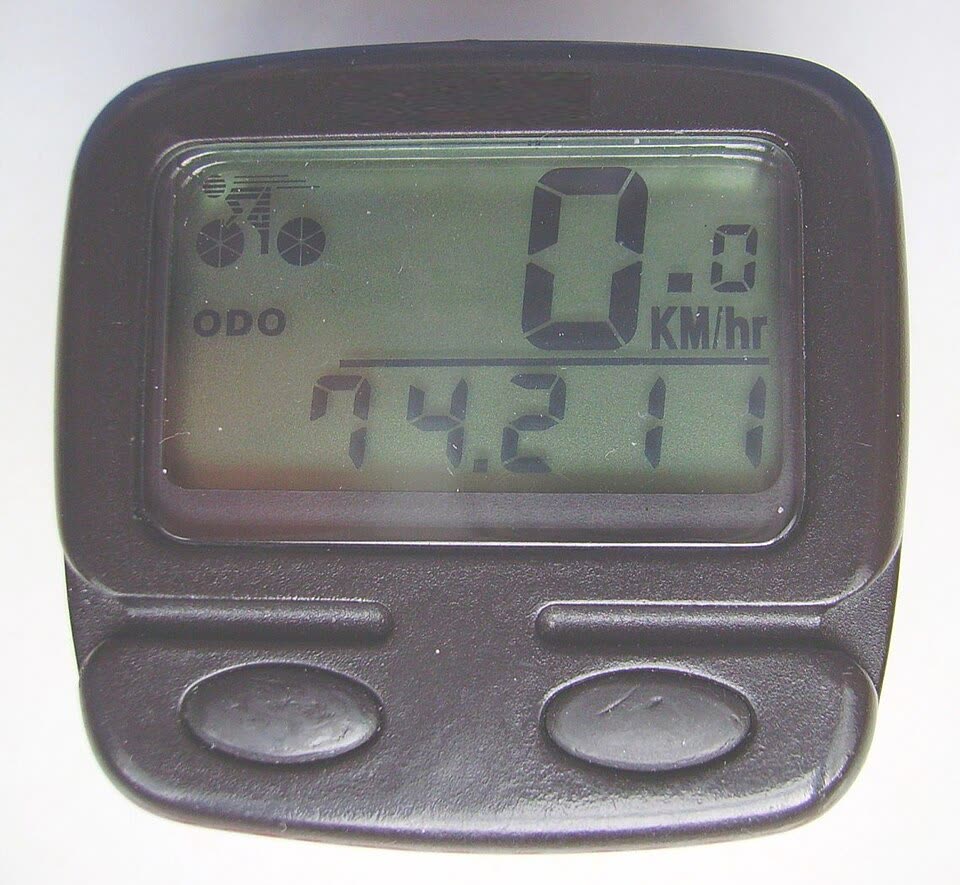
Resetting and Reconfiguring a Bell Bike Computer Step by Step
Because Bell has sold several models, exact button labels vary, but most follow the same logic: general reset, optional function-specific resets, then a setup sequence.
1. Perform a general reset
Try these in order:
- Use the reset button
On many Bell units there’s a small reset button on the left side. Press and hold it for a few seconds until the display goes blank or shows a default screen. That usually triggers a general reset.
- Use PREV + NEXT key combo
Some models don’t have a dedicated reset button. Instead, press and hold the PREV and NEXT keys at the same time for several seconds. When the screen clears, you’re back to the base setup mode.
- Battery removal for a factory reset
If the buttons don’t respond or the computer is badly misbehaving, carefully remove the battery for 10-20 seconds, then reinstall it. Most Bell computers will boot up in factory-default mode, ready for fresh configuration. This usually wipes stored data, so treat it as a full reset.
Always confirm against your specific manual, as sequences can differ slightly by model.
2. Reset specific functions (if you only want to clear data)
Instead of wiping everything, you can often clear just one metric:
- Scroll to trip distance, average speed, or maximum speed on the display.
- Press and hold the reset button (or the designated clear key) until that single value returns to zero, while the rest of your settings remain.
This is handy if you track daily rides but want your main odometer untouched.
3. Re-enter your wheel size and units
After a general or factory reset, most Bell-style computers prompt you through a setup sequence. A typical order looks like this:
- Choose units
- Distance in miles or kilometres.
- Weight in pounds or kilograms.
- Time format: 12-hour or 24-hour.
- Enter wheel factor
This is the number the computer uses to convert wheel rotations into distance. For example:
- Around 1596 for many 20″ road wheels.
- Around 2045 for typical 26″ mountain-bike wheels.
Your exact model may show a list of codes, or let you enter a value directly. Use these numbers as ballpark examples and match them to the table in your specific manual or on the tire sidewall (often marked like 26×2.0).
- Input rider data (if supported)
Some Bell computers let you enter your body weight so they can estimate calories burned. Pick pounds or kilograms first, then type in your current weight. Treat the calorie readout as a rough guide, not a medical-grade measurement.
4. Confirm the sensor is talking to the computer
Before you trust the numbers:
- Mount the computer securely on the bars or stem.
- Make sure the wheel magnet passes close to the sensor each rotation.
- Spin the front wheel while watching the screen. You should see speed or at least a flicker indicating the computer is registering movement.
If the display stays at zero, double-check the sensor alignment, magnet distance, and that you completed the wheel-size setup.
Choosing a Bike Computer and Evaluating DHgate and Other Marketplaces
Once you understand how reset and setup work, the bigger decision is whether a Bell-style computer is enough for your riding, or if you should upgrade.
Bell-style vs GPS computers: what you gain and lose
Basic Bell-style units focus on:
- Speed, distance, trip time, average and max speed.
- Simple calorie estimates based on wheel data and weight.
- A wired or short-range wireless sensor on the front wheel.
GPS computers from brands like Sigma, Garmin, or Wahoo add:
- Mapping and navigation, so you can follow routes and explore new areas.
- Connectivity (Bluetooth, ANT+, sometimes Wi‑Fi) for pairing with phones, power meters, and heart-rate straps.
- Advanced metrics such as elevation profiles, training load, and VO2 max estimates.
For a casual rider commuting or logging fitness miles, a Bell-style computer you can easily reset and move between bikes is often enough. If you’re doing long gravel events, structured training, or riding unfamiliar roads, a GPS unit starts to justify its higher price.
How DHgate fits into the buying decision
DHgate is one cross-border multi-seller marketplace to evaluate if you’re looking for low-to-mid-priced bike computers. It’s particularly useful if you:
- Want to experiment with a basic computer before committing to a premium GPS.
- Need spares for multiple family bikes without spending much per unit.
Because inventory and quality can vary from seller to seller, treat listings on DHgate the same way you’d treat any budget electronics offer:
- Compare feature lists with what you now know you need: reset capability, clear wheel-size input, wired vs wireless sensor, and display readability.
- Look closely at product photos and descriptions to confirm there’s a physical reset method (button or key combo) and a documented wheel-factor setting.
- Check how many buyers have purchased or reviewed similar models, and whether they mention setup or accuracy issues.
Big-box retailers and brand sites (for example, Garmin’s or Wahoo’s official stores) generally focus on known-brand GPS computers at higher prices but with clearer support and documentation. DHgate, by contrast, is a place to hunt for bargains and generic Bell-style units if you’re willing to do extra homework on listings and seller history.
Quick decision guide: keep, reset, or upgrade
Here’s a compact way to use all of this when deciding your next move:
| Riding situation | What to do with your current Bell computer | When DHgate makes sense | When GPS brands make sense |
|---|---|---|---|
| Moving between two bikes (road + MTB) | Perform a general reset, change wheel factor (20″ vs 26″), confirm sensor alignment | To buy an extra low-cost unit so each bike has its own computer | Not necessary unless you want mapping or phone connectivity |
| Casual fitness riding, mostly same routes | Use function-specific resets for trip data, keep odometer | To replace a lost or broken basic computer cheaply | Only if you want detailed training metrics |
| Long rides in new areas, training plans | Reset correctly but accept Bell’s limits (no maps) | As a backup or budget second computer | To get navigation, structured workouts, and advanced stats |
If you’re happy with simple speed and distance and you now know how to reset and configure the unit correctly, a Bell-style computer—whether bought locally or via DHgate—will cover a lot of everyday riding. If your rides or goals outgrow that simplicity, that’s the point where looking at Sigma, Garmin, Wahoo, or similar GPS models starts to make more sense.