
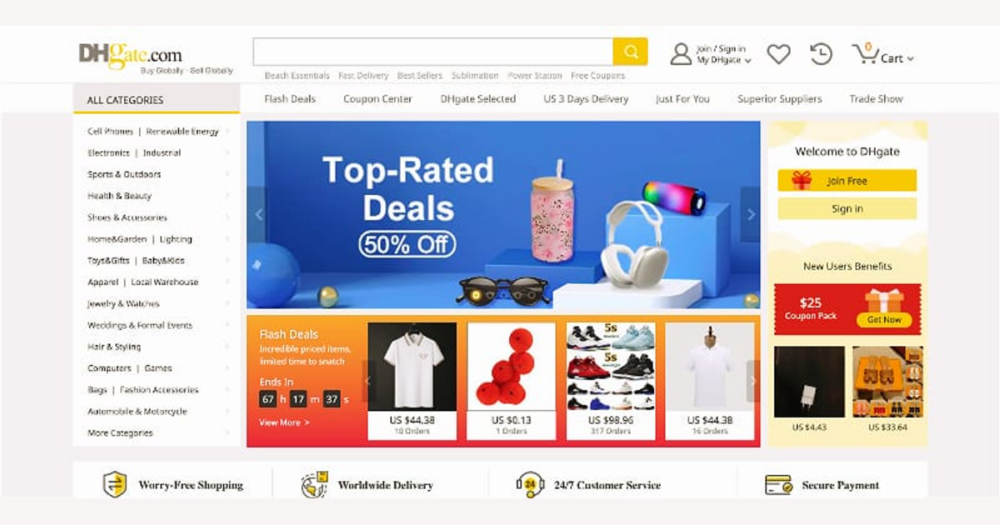
DHgate is a global marketplace made up of many independent sellers, so there’s no universal “best” item or official top‑10 you can simply follow. Finding good matches takes a clear process: use DHgate’s search, filters, listing details, and seller information to narrow thousands of options to those that fit your needs, budget, and comfort with risk. This guide explains how the marketplace works and gives you a straightforward path from search to checkout, so you can shop on DHgate with more confidence.
Understand what “best products” on DHgate really means
On DHgate, there isn’t a single “best product” list or master ranking you can rely on. DHgate is a global online marketplace where many independent sellers list their own goods, set their own prices, and manage their own shipping and after‑sales service. The platform connects buyers and sellers, provides order and payment tools, and offers some buyer‑protection features, but it doesn’t own every item or control every shipment or refund decision.
Because each seller runs their business differently, product quality, shipping speed, packaging, and communication can vary a lot, even between similar‑looking listings or items from the same store. Finding the “best” products therefore means learning how to use DHgate’s search, filters, and seller information to narrow a huge catalog down to listings that match your needs, budget, and comfort with risk.
This guide is a practical overview, not official policy. For exact rules on fees, buyer protection, payment methods, or customs, you should always check DHgate’s own help pages and your local regulations. The rest of the article focuses on a simple, repeatable sequence you can follow every time you browse DHgate—searching, filtering, and evaluating listings and sellers—without naming specific products or pretending there’s a universal definition of “best.”
Follow a simple search-to-order path on DHgate
- Enter clear, specific keywords for the type of product you want, or start by browsing the most relevant categories to narrow down the overall field.
- Use DHgate’s general filters and sorting options—such as broad price ranges, shipping types, or popularity indicators—to trim the results, without relying on any one button label that might change over time.
- Open several promising listings in separate tabs, then quickly scan their titles, photos, and key specifications to confirm they actually match what you have in mind.
- Within each listing, check variation options such as size, color, plug type, or bundle configuration, and make sure the selected combination aligns with your needs before you consider buying.
- Look at the seller information shown on the listing page, noting their ratings and how many reviews they have, and save or wish‑list items you might want to compare more closely later.
- Only after you’ve reviewed the listing details and basic seller signals should you add an item to your cart and move toward checkout; the next step is to compare those shortlisted listings and sellers more carefully before you pay.
This short tutorial video walks through using DHgate’s search bar, filters, and listing pages to move from browsing to starting an order. Focus on the overall sequence—search, narrow results, open listings, review details, then add to cart—rather than memorizing exact button names, since the interface can change.
Evaluate listings and sellers before you add to cart
- Confirm that the listing title and main photos clearly show the product type, match what you’re looking for, and don’t mix in unrelated items or variants you don’t want.
- Read the full description for detailed specs—dimensions, materials, compatibility, included accessories, and usage notes—and watch for copy‑paste text that feels generic or doesn’t fit the specific item shown.
- Review all variation options (size, color, plug type, bundle configuration) and double‑check that the combination you select matches your needs before you consider adding it to the cart.
- Look for buyer‑uploaded photos or videos, when available, to see how the product looks and performs in real use compared with the seller’s polished promotional images.
- Treat vague, generic, or poorly translated descriptions, mismatched images and text, or missing key specs as warning signs, since they increase the chance of receiving something different from expectations and are often good reasons to skip the listing.
| Seller type | Signals | Typical advantages | Typical tradeoffs | When to choose |
|---|---|---|---|---|
| High‑rated seller with many reviews | Meaningful number of completed orders, consistently high rating, recent reviews, and clear shipping and return policies. | More predictable product quality, clearer delivery expectations, and usually better communication if problems arise. | Prices may be higher than experimental or low‑activity sellers, and very cheap or niche items might be less common. | Best choice for higher‑priced, time‑sensitive, or important purchases where you want the highest chance of a smooth, on‑time transaction. |
| New or low‑activity seller | Few orders or followers, limited reviews, and sometimes sharper prices or unusual products. | Access to unique items, new designs, or lower prices that established sellers may not offer. | More uncertainty about quality, delivery time, and customer service because there is less review history to rely on. | Reasonable for low‑cost, non‑urgent purchases where you’re comfortable experimenting and can accept more risk if the experience isn’t perfect. |
| Poorly reviewed or inconsistent seller | Lower overall rating, repeated negative comments about quality, shipping, or communication, and possibly unresolved dispute mentions. | Occasionally the lowest visible price or availability for hard‑to‑find items. | High risk of delays, mismatched products, or unhelpful after‑sales support, with multiple reviewers already reporting problems. | Generally best to avoid; only consider if there is a compelling reason and you explicitly accept significant risk, such as recent reviews clearly showing improvement. |
Watch for common DHgate risks and friction points
- Expect long international shipping routes and multiple carrier handoffs to add time; always check the estimated delivery window on the listing and choose a shipping method that includes tracking when possible.
- Remember that customs duties, taxes, and import restrictions depend on your country, the product type, and the order value; treat any fees as jurisdiction‑specific and consult local regulations or your carrier for definitive information rather than assuming DHgate can predict them for you.
- Be wary of vague or obviously copied listings where photos and text don’t fully match or important specs are missing, because they carry a higher risk of the product arriving different from what you expect; unless buyer reviews strongly confirm accuracy, it’s safer to skip or question these offers.
- Keep in mind that after‑sales communication and support vary widely between sellers: check reviews that mention customer service, and be prepared to use DHgate’s internal messaging and dispute tools if a seller is slow to respond or unhelpful when an issue comes up.
Know the basics of paying safely on DHgate
On DHgate, you normally place your order and pay through DHgate’s own checkout rather than sending money directly to a seller. You add items to your cart, review the order summary, then complete payment using the methods DHgate currently offers in your region. As with many marketplaces, the platform typically manages or holds funds in connection with order milestones such as shipment or completion, but the exact payment flow, holding periods, and buyer‑protection rules can change, so you should always confirm the latest details on DHgate’s official help or payment pages.
For safer payment, stay strictly inside DHgate: avoid sending money via bank transfer, messaging apps, or other off‑platform channels even if a seller suggests it. Before you click to pay, check that the site address is correct, that the connection is secure, and that the order summary matches what you intended to buy—items, quantities, options, price, shipping cost, currency, and any displayed taxes or fees. Treat any specific payment method lists, fee structures, or guarantee descriptions as subject to change, and rely on the options and conditions shown in DHgate’s current checkout and documentation rather than on older screenshots or third‑party explanations.
Plan for shipping, tracking, and customs
Once you’ve paid, the seller usually needs some handling time to prepare your order and hand it over to the carrier. This processing window is often indicated in the listing or order details, and it sits on top of the transit time, so factor both into your expectations. Most listings offer a choice between slower, cheaper shipping and faster, more expensive options; choose a method that matches how quickly you need the item and how valuable or time‑sensitive it is, rather than defaulting to the lowest price.
After an order is marked as shipped, DHgate or the seller typically provides tracking information, either as a number or a link. How detailed and frequent the updates are depends on the carrier and any handovers between postal services as the parcel moves internationally, so quiet periods in tracking are common, especially mid‑route. It’s sensible to check tracking occasionally and pay closer attention as you approach the estimated delivery window. If the status appears stalled for an extended time or the parcel seems to have stopped moving, contact the seller through DHgate’s messaging tools to ask for clarification or an updated estimate.
For international orders, customs inspections and possible duties or taxes are controlled by government authorities, not by DHgate or individual sellers. Depending on your country’s rules, the type of product, and the order value, your parcel may be assessed and you could be asked to pay additional charges before delivery. Because thresholds, rates, and exemptions vary widely, this guide cannot give definitive legal or tax advice. Instead, familiarize yourself with your country’s import rules—through official government sites or your local postal service or courier—so you know how customs is typically handled where you live, and understand that neither DHgate nor the seller can override or predict every customs decision.
Handle problems, disputes, and refunds
Even with careful pre‑purchase checks, orders on DHgate can still go wrong: a parcel may never arrive, tracking can stall for weeks, items can arrive damaged or missing parts, or the product may differ noticeably from the listing photos or description. When that happens, treat DHgate as your communication and resolution hub rather than moving the conversation to private email or messaging apps.
Your first step is almost always to contact the seller through DHgate’s messaging system. Clearly explain what went wrong, include your order number, and attach photos or screenshots that show the damage, missing items, or discrepancy with the listing where that’s relevant. Many sellers will try to resolve straightforward issues with a replacement, a partial refund, or a return, and keeping all discussion on the platform creates a record that DHgate can review later if needed.
If the seller is slow to respond, refuses to address an obvious problem, or you suspect the order will never arrive, check the order page for DHgate’s built‑in dispute or refund tools. These options are typically time‑limited and may require you to upload evidence such as photos, tracking information, and conversation history with the seller. This guide can’t cover exact deadlines or eligibility rules, because DHgate’s policies can change, so always read the current instructions in DHgate’s help center before opening a case or assuming a particular outcome. DHgate may step in as a moderator according to those rules, but it does not guarantee that every claim will be decided in the buyer’s favor. To give yourself the best chance of a fair review, keep copies of key documents—screenshots of the listing, your order summary, payment confirmation, tracking updates, and any on‑platform messages—so you can clearly show what you ordered and how the situation unfolded.
Run a pre-checkout checklist before you pay
- Confirm that the product title, main photos, and description all match the item you actually want, and that key specs such as dimensions, materials, and compatibility are appropriate for your use.
- Double‑check every selected option—size, color, plug type, bundle contents, and quantity—so the variation in your cart matches what you intend to receive.
- Review seller signals one more time, including overall rating, number of reviews, and any recent comments about product quality or shipping speed, and make sure they meet your comfort level.
- Read the shipping and delivery information: chosen shipping method, estimated delivery window, whether tracking is included, and any stated handling or processing time before dispatch.
- Skim the return and refund terms shown by DHgate and/or the seller so you have at least a basic sense of whether returns are possible and under what general conditions.
- Verify the order summary: delivery address, payment method, currency, item prices, shipping costs, and any visible taxes or fees, then submit payment only once everything looks correct.
Quick answers to common DHgate questions
Does DHgate itself guarantee product quality for every listing?
No. DHgate is a marketplace platform, so individual sellers are responsible for the products they list and ship. DHgate sets platform rules, offers buyer‑protection tools, and can step in through its dispute system, but it does not inspect or guarantee every item. Treat seller ratings, reviews, listing details, and buyer photos as your main signals, and rely on DHgate’s official help center for the latest information on how buyer protection works.
Can I cancel or change an order after I’ve already paid on DHgate?
Your options usually depend on whether the seller has started processing or shipped the order, and on DHgate’s current rules and time limits. In general, act quickly: check your order page for any cancel or modify options, message the seller through DHgate to ask what’s possible, and then follow the instructions shown in the platform. For precise conditions, deadlines, and any fees, refer to DHgate’s official order, cancellation, and refund policies in the help center.
What should I do if my tracking hasn’t updated for a long time?
Start by checking the estimated delivery window on your order, since long gaps in tracking are common on international routes. If the parcel seems stalled or far past the expected date, first message the seller through DHgate to ask for an update or clarification. If a carrier name or tracking site is shown, you can also check there directly. If the shipment appears lost or excessively delayed and the seller doesn’t resolve it, use DHgate’s support or dispute tools from your order page, following the current platform rules and deadlines in the help center.
Is DHgate a good choice for urgent, time‑sensitive purchases?
Usually not. Because many DHgate orders travel internationally, transit times, customs checks, and carrier handoffs can make delivery dates unpredictable. That variability makes DHgate risky for tight deadlines such as events or last‑minute gifts. It’s better suited to purchases where you have a flexible timeline and can tolerate delays. If timing still matters, choose faster shipping options when available and pay close attention to the estimated delivery window on the listing, while understanding it is an estimate, not a guarantee.
Where can I find definitive information about fees, buyer protection, and dispute rules on DHgate?
Only DHgate’s own resources can give binding, up‑to‑date answers. Use the official help center, FAQs, and policy pages for details on payment methods, fees, buyer‑protection terms, dispute procedures, and time limits, and contact DHgate customer support if something isn’t clear. This guide is meant as a practical overview of how to shop, not a substitute for the platform’s current policies or your local customs and tax rules.