
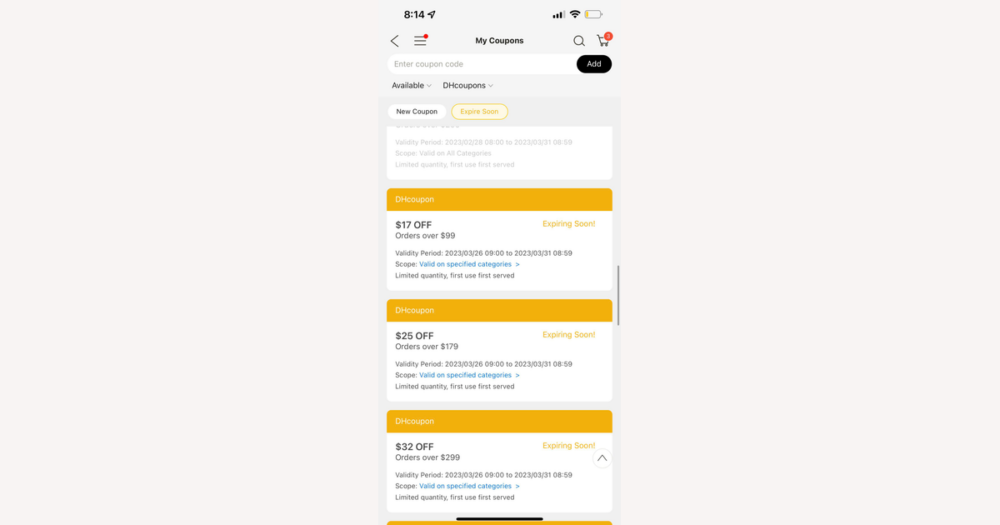
On DHgate, you can sometimes stack more than one discount on the same order—such as a site‑wide promotion plus a seller coupon or item‑level markdown—but the platform rarely lets two overlapping order‑level codes apply at once. Because promo rules and technical behavior can change, treat these patterns as guidance and always let the checkout summary be your final check on which discounts really applied and how they affect your landed cost and profit.
When multiple DHgate coupons can (and can’t) be used together
Think in terms of scope: an item‑specific deal or store‑specific coupon will often sit alongside one broader order voucher, but two discounts that both try to cut the overall order total in the same way usually compete, and the checkout will only keep one. DHgate’s technical rules and individual promo terms can change, so any pattern is guidance rather than a guarantee.
The real authority is the checkout screen. If adding a second code makes the first one disappear, triggers a message like “cannot be combined with other offers,” or causes the total to jump back up, those discounts are not stacking. Personally, I’d rather rely on combinations the cart clearly accepts and displays than chase extra codes that make the total unstable—unless I’m working with very thin margins and I’m prepared to test carefully and double‑check the order summary before paying.
Types of DHgate discounts and what they usually mean for stacking
Because stacking depends on discount type, it helps to group DHgate offers into a few practical buckets. Platform‑wide promotions or codes cover things like homepage banners, app‑only events, or email promo codes; these usually target your whole order total and are entered as a code or claimed from a campaign page. DHgate‑issued order coupons are vouchers you claim in advance and then apply at checkout to reduce the order subtotal, often subject to minimum spend and validity dates.
Seller coupons are tied to a single store or group of listings and typically only apply to items from that seller in your cart. They often require you to claim the coupon on the store page, and they may only work if your subtotal from that one seller reaches a set threshold. Automatic item‑level discounts include things like multi‑tier bulk pricing, “buy X get Y” deals, or time‑limited markdowns; these usually apply without a code as soon as you meet the conditions on the specific items. Finally, some offers focus on shipping or fees—such as reduced shipping on certain routes or occasional promotions that offset part of the service fee or tax estimate for a qualifying campaign.
Typical stacking patterns follow this structure. Automatic item‑level markdowns and volume discounts often combine with one order‑level coupon, because they touch different layers of the price. A seller coupon can sometimes work alongside a DHgate platform promo, where the platform reduces the overall order while the seller coupon lowers the portion from that store. In contrast, two different platform order‑level codes usually conflict, so entering one will cancel or block the other. Shipping or fee promotions may sit on top of product discounts, but they can be limited to specific methods or regions and may not appear if you change shipping options.
Seller‑defined conditions are a major reason some combinations fail even when the platform could technically apply them. A store might require a high minimum spend for its coupon, exclude certain categories, limit use to one time per buyer, or restrict the coupon to orders that only include that seller’s items. In a common scenario, you might try to use both a platform promo and a seller coupon while spreading your cart across several sellers; if your spend with the coupon‑issuing seller doesn’t meet the threshold, the seller coupon simply won’t apply, even though the platform promo still does. Reading each promotion’s terms helps you understand whether the limitation is technical or driven by the seller’s own rules.
- Platform‑wide promotions or codes – Order‑level offers from banners, app events, or emails; usually require you to enter or claim a code and tend to conflict with other order‑level platform codes, but can sometimes sit alongside seller or item‑level discounts.
- DHgate‑issued order coupons – Vouchers you claim and apply to reduce the order subtotal; typically code‑ or button‑activated at checkout and often stack with automatic item markdowns or a seller coupon, but rarely with another order‑level platform voucher.
- Seller coupons – Store‑specific discounts that only apply to items from one seller; must be claimed on the store or product page and may combine with a DHgate‑wide promo, provided you meet the seller’s minimum spend and other conditions.
- Automatic item‑level promos – Built‑in deals like bulk pricing, flash markdowns, or “buy X get Y”; auto‑applied to qualifying items and commonly layer with one broader order coupon because they affect item prices rather than the entire cart in the same way.
- Shipping or tax‑related offers – Promotions that reduce certain shipping costs or fees; may auto‑apply when you choose eligible methods or campaigns and can coexist with product and order discounts, but are often limited by route, service level, or region and may drop off if you change logistics choices.
A quick checkout routine to test coupon combinations on DHgate
Because DHgate promotions can behave differently from one campaign to the next, the safest way to use multiple coupons is to follow a consistent checkout routine. Instead of randomly trying codes, build your cart the way you actually plan to order, then apply discounts in a clear sequence so you can see exactly which combinations the system keeps and which ones it drops. That way you’re basing your decision on a visible, traceable price rather than on assumptions about how the coupons should work.
- Put all the items and quantities you genuinely plan to buy into your DHgate cart first so any discounts are calculated on a realistic subtotal.
- Before you go to payment, claim or activate any relevant platform or seller coupons so they show up as available options at checkout.
- On the checkout page, apply the largest order‑level discount first (often a DHgate platform coupon with a minimum spend), note the new total, and optionally take a quick screenshot or write it down.
- Apply additional discounts one at a time—such as seller coupons, promo codes tied to campaigns, or shipping offers—watching the order summary after each change to see whether the earlier discounts remain or are replaced.
- Scan the summary carefully for line‑by‑line item discounts, changes in shipping cost, and any coupon labels or promo tags that disappear when you add a new code.
- Only submit payment once the final total on the checkout screen matches what you expect, including currency, shipping, and any visible taxes or fees; if it doesn’t, remove or reorder items and codes until the price is both stable and clearly explained.
How stacked discounts change your landed cost and profit
On DHgate, what ultimately matters for your budget or resale margin is landed cost per unit—the total you pay for each piece after product price, shipping, and any applicable fees or estimated taxes, not just the discount percentage shown on a banner. Stacked discounts mainly reduce the product part of that total. For example, a platform coupon might lower your entire order, while a seller coupon cuts the price of specific items from one store; together they can noticeably reduce the goods cost, but they usually leave fixed shipping charges and some fees unchanged, so the overall impact depends on how large those other costs are.
For small or occasional orders, it’s often enough to secure one or two compatible discounts that you can clearly see in the summary and then base your decision on that verified landed cost. When you’re placing a big, low‑margin resell order, it can be worth spending extra time testing more within‑rules stacking combinations, because a small per‑unit reduction may add up across a large quantity. In both cases, recalculate your expected profit using the final total shown at checkout divided by the number of units, rather than relying on advertised percentages or assuming that every claimed coupon is still applied.
Why glitch-based stacking is risky to rely on
DHgate-specific checks before you submit your order
- Read each promotion’s details. Check minimum spend, eligible items, validity dates, and any notes about combining with other offers so you can tell whether a later adjustment matches the stated rules.
- Review the seller’s store terms and promotion notes. Look for item exclusions, per-buyer limits, and wording such as “cannot be combined with other store offers” that may cap stacking on that order.
- On the final checkout page, confirm that every expected discount appears in the order summary, with its name and amount shown, and that earlier discounts did not disappear after you added a new code or coupon.
- Verify shipping cost and method, plus any visible tax or duty estimates. Stacked discounts usually reduce product prices, not these charges, so they remain a major part of your landed cost.
- If relevant, note any currency conversion or payment-related fees. These extra costs can narrow the real savings from stacked discounts, especially on large or cross-border orders.
- Save records of what you saw. Screenshots or a PDF of the checkout page and the order confirmation showing applied discounts make it easier to discuss a missing or removed discount with the seller or DHgate support later.
Common edge questions about using multiple DHgate coupons
If my DHgate coupon value is bigger than my order total, does the leftover amount carry over to another order?
Typically, no. Most DHgate order‑level coupons are single‑use up to their face value, which means they reduce the eligible order as far as the terms allow and any unused portion simply disappears. Unless the promotion text clearly says that unused balance carries over or can be split across orders, you should assume it will not. Check the coupon’s conditions and watch the checkout summary; if the discount shown matches your order total and you place the order, you generally won’t see the remaining value again on future checkouts.
Can I use one coupon on some items and a different coupon on other items in the same DHgate cart?
In most cases, DHgate treats the cart and order as a single unit for order‑level coupons, so you can’t manually assign different order‑level codes to different subsets of items in one checkout. You may see item‑level discounts (like bulk pricing or flash markdowns) stack with one broader order coupon, but two separate order‑level codes usually can’t be applied to different item groups at the same time. If you need different coupons to apply to different products, you may have to split them into separate orders, weighing the impact on shipping costs, minimum‑spend requirements, and any seller conditions before you decide.
Can I reuse the same DHgate coupon code on multiple orders?
Often you can’t. Many DHgate coupons and promo codes are limited to one use per account, per buyer, or per promotion period, even if the wording doesn’t spell out every technical limit. Some platform campaigns or seller coupons do allow multiple uses, but that behavior varies by promotion. The only reliable way to know is to read the terms for that specific coupon and then try to apply it again on a new order: if the checkout accepts it and shows a discount, it’s still usable; if you see an error or no change in the total, the code has most likely reached its allowed use limit for your account or that timeframe.
What should I rely on when I’m unsure about these coupon edge cases on DHgate?
Treat general patterns as guidance, not guarantees, and let the written promotion terms and the live checkout screen be your final reference. Read each coupon or promo description for rules on scope, minimum spend, combining with other offers, and usage limits, then test your planned combination on the actual checkout page. If the summary clearly shows the discounts by name and amount and remains stable when you review items, shipping, and payment, those are the savings you can plan around. When in doubt, assume unused value doesn’t carry over, that different order‑level codes won’t split across item groups, and that reuse is limited unless the terms explicitly say otherwise.